- Softonic Rating:
- Very good:8/10
- License:
- Evaluation
- Added:
- October 26, 2007
- Publisher:
- Website
- File size:
- 15.8 MB
- Downloads:
- 477
- DownloadEvaluation
“Complete graphic editor for retouch and edit”
by Cyril Roger
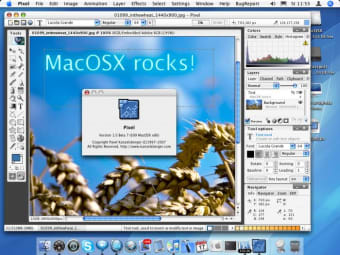
The image editor market is pretty much dominated by Photoshop, with all the other applications battling it out behind for second place. Pixel Image Editor, trying to make itself a place behind Adobe's star app, seems to be aimed towards more advanced users, particularly photographers. The installation process was pretty lengthy and we were really surprised at all the time it took to start up (much more than Photoshop). The first time you launch Pixel you can also easily be taken aback by all the windows and options in the interface. However a quick look around will reassure you that Pixel offers everything that you need.
We liked the collections of editing tools on hand in the left side floating bar, and found an ample collection of both layers and effects to work with. Pixel also has a handy "workspaces" feature, to avoid having your window to cluttered with objects and images. Users will be glad to also find tools to optimize images for the web.
A bit too complex for some users, but Pixel is still an image editor fitted with many useful features.
Languages:
English, Spanish
Limitations:
30 day Trial Period Watermark
Registry message
OS requirements for Pixel Image Editor:
- OS: Mac OS X
Minimum requirements:
- Mac OS X 10.2 or later
- Large range of tools
- Lots of layers and effects
- Workspaces
- Too complex for most people
- Cluttered interface
- Long startup time
Featured program
Softonic gives special recognition to software of exceptionally high quality. More information
From the publisher of Pixel Image Editor
Pixel is a RGB, CMYK and HDR image editing, photo retouching and manipulating program available for many operating systems formerly known as Pixel32.
Features:
- Support for layers, channels, masks and selections
- Color Management support for RGB, CMYK, Grayscale and CIE Lab modes (8-bit and 16-bit)
- Support for HDR (High Dynamic Range) images with 32-bit/channel precision, HDR images in Pixel are editable in full HDR quality, not in 8-bit RGB as in competiting programs
- Realtime live effects for layers (adjustments, effects), sets of live effects can be saved as layer Styles
- Image browsing and searching
- Includes variety of brushes, including full-color brushes and animated brushes
- Brush retouching tools including special effects
- Retouching set of filter plug-ins
- Complex support for image slicing and image optimizations (GIF, PNG, JPEG, WBMP)
- Direct editing of generated HTML code without destroying user’s additions
- Support for clickable maps
- Support for small animations for your web pages (animated GIFs)
Sponsored Links
Programs similar to Pixel Image Editor
Pixel Image Editor options
Reviews for Pixel Image Editor in other languages
- Pixel Image Editor (Análisis en español)
Pixel Image Editor in other platforms
- Pixel Image Editor (Windows)
Your opinion is important!